Content Refresh SEO Strategy: Rank Higher With Old Posts
Your old blog posts are losing rankings every month they sit untouched. Here is a step-by-step content refresh strategy for business owners — which posts to update, what to change, and how to know it worked.

You have old blog posts sitting on your website right now — posts that used to bring in traffic, used to rank, and now sit buried on page three doing nothing. Updating old content to rank higher on Google is one of the most underused moves in SEO. It costs less than creating new content, works faster, and builds on authority you have already earned.
A content refresh SEO strategy gives you a repeatable system to decide which posts deserve attention, what to actually change, and how to measure whether the update moved the needle. This is not a guide for SEO professionals with enterprise tools. It is a step-by-step process any business owner with a blog and a Google Search Console account can follow this afternoon.
Why Your Old Blog Posts Are Losing Traffic
Every blog post follows the same arc. It publishes, earns traffic, hits a peak — and then starts declining. This is not a failure of the content. It is how search works.
Three forces push old posts down in rankings. First, competitors publish newer articles on the same topic — articles with fresher data that match what searchers want today. Second, search intent shifts. A query that used to trigger how-to guides might now trigger comparison pages or product listings. Your post has not changed, but what Google wants to show for that query has.
Third, your information goes stale. A post referencing a 2022 study or a deprecated tool tells Google — and your readers — that nobody is maintaining this content. Google's ranking systems weigh freshness more heavily for topics where recency matters. Most business, marketing, and technology topics qualify.
The decline is gradual. You will not wake up one morning to find your post has disappeared. Instead, it slips from position 4 to position 8 over three months, and clicks drop by half before you notice. That is why monthly check-ins on your top-performing posts matter — they catch the slow bleed before it compounds into a problem.
This pattern accelerates in 2026. Google's February Core Update placed even more weight on content freshness, and AI search tools now favour recently updated sources when generating answers. A post untouched for 12 months is losing ground on two fronts simultaneously.
Does Refreshing Old Content Actually Improve Rankings?
Yes. And it is one of the most predictable SEO tactics available to any business owner. Research from Backlinko found that historical content optimisation can drive up to a 106% increase in organic traffic — from pages that already exist on your site.
The reason is straightforward. A refreshed post keeps the backlinks, domain authority, and indexing history it already earned. A brand-new post starts from zero. Google does not need to discover, crawl, and evaluate a refreshed page the way it does a new one — the foundation already exists. You are just making the content worth ranking again.
Refreshing also works faster than publishing new content. Most businesses see measurable movement within 30–60 days of a meaningful update. Compare that to the 3–6 months a new article typically needs to gain traction in search results. The maths is clear: if you have 50 old posts on your site, you are sitting on 50 potential ranking assets that cost nothing to create — only to improve.
The founders who get the most from a content refresh strategy are the ones who already have a library of published content. If you have been blogging for a year or more, this is the single highest-return SEO investment you can make right now.
Which Posts to Update First
You do not need to update everything at once. Start with the posts that will give you the biggest return for the least effort. Here is how to find them using nothing but the free Google Search Console.
Posts that used to rank but dropped
Go to Search Console, then Performance, then Pages. Set the date range to the last 3 months and compare it to the previous 3 months. Sort by clicks in descending order. Any page that lost more than 20% of its clicks is your first priority. These posts already proved they could earn traffic — they just need the content brought current.
Posts stuck on page two
Filter your Search Console data by average position. Look for posts ranking between positions 11 and 20. These pages are already close to page one. A content refresh — updated statistics, a stronger title, deeper coverage of the topic — is often enough to push them over the threshold. It is far easier to move something from position 15 to position 8 than to rank a new article from position 100.
Posts with high impressions but low clicks
Google is showing your page to searchers, but they are not clicking through. This usually means your title tag or meta description is outdated or does not match what the searcher expects to find. Updating just these two elements — without touching the article body — can increase your click-through rate by 50% or more.
Posts with outdated dates or statistics
If your headline says "2024 Guide" or your article cites research from three years ago, readers treat it as expired before they read the first paragraph. Google treats it the same way. Update the data, cite current sources, and change the published date to reflect when the content was last meaningfully revised.
Posts that answer questions people actually ask
Check the Queries tab in Search Console for each post. Look at the specific questions driving impressions. If your post does not directly answer those questions — or buries the answer below several paragraphs of preamble — restructure so the answer comes first. This also improves your chances of appearing in Google's featured snippets and AI-generated answers.
You do not need Ahrefs, Semrush, or any paid SEO tool to run this analysis. Google Search Console gives you every data point you need to prioritise your refreshes.
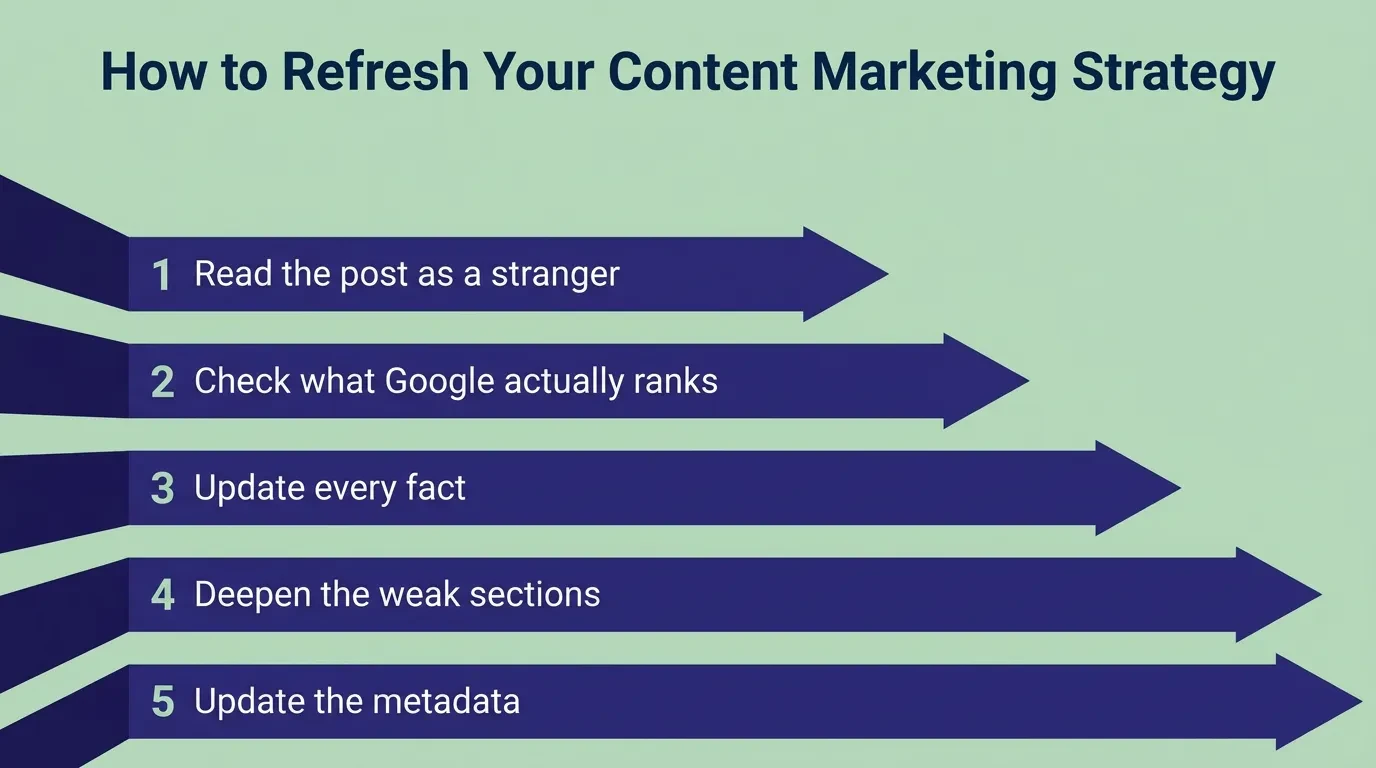
The Content Refresh SEO Strategy in 5 Steps
Here is the process. Each step has a specific action — no guesswork.
Step 1: Read the post as a stranger
Open the post in an incognito browser window. Read it start to finish without skipping anything. Mark every sentence that feels outdated, vague, or unsupported. If a fact does not have a source, flag it. If a section says "there are many factors" without naming them, flag it. If you would not send this article to a prospective client today, it needs work.
Step 2: Check what Google actually ranks for this keyword
Search your target keyword in an incognito window. Study the top 3 organic results. Note the format — are they step-by-step guides, listicles, comparison tables, or explainers? Note what topics they cover that you do not. If the top results are all detailed how-to guides and yours is a short overview, the gap is structural. That format mismatch alone can explain a ranking drop, regardless of how good your information is.
Step 3: Update every fact
Replace outdated statistics with current data from credible sources. Cite the original source for every number you include — not a blog post that references the study, but the study itself. Fix every broken link. If a tool, platform, or regulation you mentioned has changed, update the reference. Remove any screenshot that shows an interface version that no longer exists.
Step 4: Deepen the weak sections
Find the paragraphs where you wrote something vague. "It depends on your business" is not useful to a reader who came looking for an answer. Name the variable it depends on. Give the range. Show the decision framework. Specific detail is the single strongest signal of expertise that Google and AI search tools can detect. A paragraph with a named tool, a real number, and a clear recommendation will outrank a paragraph of general advice every time.
Step 5: Update the metadata
Rewrite the title tag to match what Google is currently ranking for this keyword. If every top result includes the year, add the year. Update the meta description to reflect what the refreshed article actually delivers — benefit first, not a summary. If you changed the H1, make sure it still contains your primary keyword. Finally, update the published date — but only after the content itself has genuinely changed. A new date with old content does not fool anyone.
What to Change and What to Leave Alone
Not everything on the page needs attention. Knowing what to protect is as important as knowing what to fix.
Change: outdated statistics, broken links, old tool references, screenshots from deprecated interfaces, vague claims without evidence, titles and meta descriptions that no longer match search intent, and any section that is thinner than what competitors currently rank with.
Leave alone: the URL. Changing your URL breaks every backlink pointing to that page and resets your ranking history with Google. If you absolutely must change a URL, set up a permanent 301 redirect. But in almost every case, keep the original slug intact.
Leave alone: sections that still drive traffic. Google Search Console shows which specific queries bring clicks to each page under the Queries tab. If a section is ranking for a valuable search term, do not rewrite it — deepen it instead. Add a supporting example, a more current statistic, or a clearer explanation of the same point.
Be careful when removing content. Cutting sections that seem outdated can accidentally remove the exact paragraphs that AI search tools are citing in their answers. Before deleting anything, search for your post title in ChatGPT or Perplexity. If your content appears in the response, those paragraphs are actively being used as a source. Update them rather than removing them.
Content Refresh vs. Full Rewrite
A refresh and a rewrite solve different problems. Choosing the wrong one wastes time or damages rankings you already earned.
Refresh when the page has backlinks, ranks for at least some keywords, and mainly needs updated facts, stronger structure, or deeper coverage. Most aging content fits this category. A refresh preserves the URL's authority while making the substance current. The risk is low and the payoff is fast.
Rewrite when the content no longer matches what Google ranks for that query. If every top result is a detailed comparison and your post is a generic overview, the gap is too wide for incremental changes. A rewrite changes the angle, format, and depth — but should keep the same URL to preserve whatever backlink equity the page earned.
Delete or merge when the page has no traffic, no backlinks, and covers a topic that another page on your site already handles better. Two thin posts competing for the same keyword weaken both. Consolidating them into one strong piece removes that internal competition and gives the surviving page more depth, more authority, and a better chance of ranking.
When in doubt, start with a refresh. The risk is lower, the effort is smaller, and the results show up faster than a rewrite.
How Content Freshness Affects AI Search in 2026
AI search tools — ChatGPT, Google AI Overviews, Perplexity — do not rank pages the way traditional Google search does. They select sources based on recency, authority, and how clearly the content is structured for extraction. And recency matters more than most business owners realise.
A study by Seer Interactive found a strong recency bias across all major AI models. Google AI Overviews favour content updated within the past 12–18 months. ChatGPT and Perplexity follow a similar pattern — older content appears less frequently in their generated answers, even when the underlying information is still accurate.
This makes a content refresh one of the few tactics that improves both traditional SEO and AI visibility simultaneously. A post updated this month is more likely to rank on Google and be cited in AI-generated answers than the identical post left untouched since last year. You get two channels of visibility from one update.
Structure matters as much as freshness for AI citation. When you refresh a post, format it so AI tools can extract clean answers: use descriptive H2 headings that mirror real search queries, write self-contained paragraphs that answer one question each, and include lists and tables where the content warrants them. A clearly structured page earns citations from multiple queries — not just the one you targeted.
If your blog content has not been updated in over a year, you are not just losing traditional search traffic. You are invisible to the search channel growing fastest.
How Often Should You Update Your Content?
The answer depends on the content type and how quickly your industry moves. Here is a practical schedule that fits a founder's available time.
Monthly — 30 minutes. Open Google Search Console. Check your 5 highest-traffic blog posts. If any lost more than 10 ranking positions or 20% of clicks compared to the previous month, flag them for a refresh.
Quarterly — 2 hours. Update every post that references a specific year, contains external statistics, or mentions tools and platforms that release frequent updates. These are the posts most vulnerable to freshness decay and the easiest to fix.
Twice a year — half a day. Run a full content audit. Pull every blog post URL from your site. Check which ones still drive traffic and which have gone silent. For silent posts: refresh the ones that still have backlinks, merge the ones that overlap with other posts, and remove the ones that serve no purpose and earn no links.
This schedule requires roughly 3–5 hours per month. Most of that time is spent on research and decision-making. The actual writing — updating statistics, rewriting a title, deepening a thin section — is usually the shortest part of a content refresh.
How to Measure Whether Your Refresh Worked
Give the updated post 30–60 days before drawing conclusions. Google needs time to recrawl the page, reindex the updated content, and re-evaluate the ranking.
Three signals that the refresh worked:
- Organic clicks increased by 20% or more compared to the same-length period before the update
- Average position improved by 3 or more spots for your primary keyword
- Click-through rate increased — meaning your updated title and description are earning more clicks from the same number of impressions
Three signals that it did not:
- Traffic stayed flat or declined — the refresh may not have addressed the real problem, which is often a format mismatch rather than a freshness issue
- Rankings improved but clicks did not — your content ranks higher, but the title still does not compel the click. Rewrite the title tag with a specific benefit
- Traffic spiked and dropped within two weeks — Google tested the refreshed version against competitors and decided it was not a better match for the search intent
If a refresh shows no improvement within 60 days, the problem is usually one of two things: a format mismatch with the current SERP layout, or a depth gap where competitors cover the topic more thoroughly than your post does. Check both before deciding the topic is not worth pursuing.
The Refresh Mistakes That Waste Your Time
Changing the URL. This is the most common and most damaging mistake. Every backlink pointing to the old URL breaks instantly. Every ranking signal Google associated with that address is lost. Keep the slug. Always.
Swapping keywords instead of deepening content. Removing the keywords that already rank and replacing them with new target terms confuses Google about what your page covers. Keep the terms that are driving traffic. Add depth and related topics around them instead.
Updating the date without updating the substance. Google can detect when the body text has not changed meaningfully. Changing the publish date without changing the actual content does not earn a freshness signal. It erodes trust with readers who notice the mismatch and with search engines that compare cached versions.
Rewriting everything at once on a high-traffic page. A complete rewrite on a page that still earns clicks is a gamble. Make changes incrementally instead. Update one section, publish, and monitor for two weeks. Then update the next section. If something hurts your rankings, you can isolate exactly which change caused the drop and reverse it.
Refreshing the wrong posts first. Spending hours improving a post with zero traffic, zero backlinks, and no ranking potential is a poor use of your time. Start with the posts that have existing authority — backlinks, indexed pages, some ranking history. That is where the return on your effort actually lives.
What to Do Next
You have old content on your site that is underperforming right now. Now you have a process to fix it.
Start with Google Search Console. Identify the 3–5 posts that lost the most traffic over the last 90 days. Read each one as if you are seeing it for the first time. Update the facts, deepen the thin sections, and rewrite the title and meta description to match what Google is currently ranking for that keyword.
Most founders can complete their first content refresh in a single afternoon. The posts that recover fastest are the ones that already had authority — they just needed the substance brought current.
If you want help identifying which posts on your site have the most recovery potential — or understanding how a content refresh fits into a broader SEO strategy for your business — here is how Vediwood approaches SEO for business owners. One conversation. No pitch. Just a clear assessment of what your content needs to start earning traffic again.
Follow Us
Most founders read us once and change something that week.
Every issue covers one thing that makes your website work harder — better conversion, stronger SEO, or smarter design. No fluff, no agency speak. Just the decision you need to make this week.
Our Team

Sadiki Said
Full Stack Developer

Nezha Essyed
Content Strategist