Website Security for Small Business: The 2026 Guide
Most small business sites get hacked by automated bots scanning for one weak point — not by someone who chose you. This is the plain-English guide to closing those gaps, from SSL and backups to the 2026 certificate rule that catches most owners off guard.

Most small business websites don't get hacked because someone targeted them. They get hacked because an automated bot found one weak point — an outdated plugin, a reused password, a form that trusts whatever a visitor types. Website security for small business is really about closing those gaps before a script finds them, and most of the work is simpler than the vendors selling you tools want you to believe. If the technical side has always felt like someone else's job, this is where to start. You don't need to become a security engineer — you need to know what actually matters, and in what order.
No, Your Business Isn't Too Small to Get Hacked
The most common security mistake a small business owner makes is assuming size is protection. It isn't. Attackers don't pick targets by hand — they run scripts that scan thousands of sites an hour, looking for known weaknesses.
To a bot, a five-page plumbing site and a national retailer look identical. Both are just an IP address running software with version numbers to check against a list of public vulnerabilities. If your site runs an outdated plugin with a known flaw, the scanner finds it whether you get ten visitors a month or ten thousand.
This is why the "we're too small to matter" logic fails. You're not being singled out — you're being swept up. The 2026 Verizon Data Breach Investigations Report found that the human element was involved in the majority of breaches, usually through stolen credentials or one wrong click — failures that have nothing to do with company size.
I've watched a client's contact form get hit with thousands of spam submissions over a single weekend. Nobody chose them. A bot farm was testing every form it could reach, and theirs answered. The real risk for small businesses isn't that they're attractive targets — it's that they're undefended and easy.
Why HTTPS Alone Won't Protect Your Website
Plenty of owners see the padlock in the browser bar and assume the site is safe. That padlock means one specific thing: traffic between the visitor and your server is encrypted. It says nothing about whether your site can be broken into.
HTTPS protects data in transit. Passwords and card numbers can't be read as they travel across the network. It does not patch a vulnerable plugin, strengthen a weak admin password, or block a malicious form submission. A site can carry a flawless SSL certificate and still be fully compromised through the back end.
That gap is exactly where the false sense of safety lives. The encryption is doing its job perfectly while everything behind it sits wide open. Treating HTTPS as "security handled" is like locking your car doors and leaving the keys on the roof.
So yes — you need SSL on every page. But SSL is the floor, not the ceiling. Everything else in this guide is what the padlock doesn't cover.
The SSL Certificate Rule That Changes in 2026
Here's the part that catches owners off guard, and it starts this year. The lifespan of SSL/TLS certificates is being cut sharply over the next few years, and if you renew yours by hand, you will eventually miss a deadline.
Today a certificate can last just over a year — 398 days. Under a schedule approved by the CA/Browser Forum in 2025, that maximum drops in stages: down to 200 days in March 2026, 100 days in 2027, and just 47 days by 2029. The reasoning is sound — a shorter lifespan limits the damage a stolen certificate can do. But it shifts the burden onto site owners.
A certificate you forget to renew doesn't fail quietly. Browsers show your visitors a full-screen "Not Secure" warning, and most of them leave without reading it. At 398 days, manual renewal was survivable. At 47, it's a missed deadline waiting to happen.
The fix is automation, not vigilance. Use a host or certificate provider that renews and installs certificates automatically — Let's Encrypt and most managed hosts already do this through the ACME protocol. If you take one forward-looking action from this guide, make it this: confirm your certificate auto-renews, today.
Website Security for Small Business Starts With Five Fixes
Most attacks are stopped by a handful of basics, not by expensive software. Get these five right and you've closed the doors that the majority of automated attacks walk straight through.
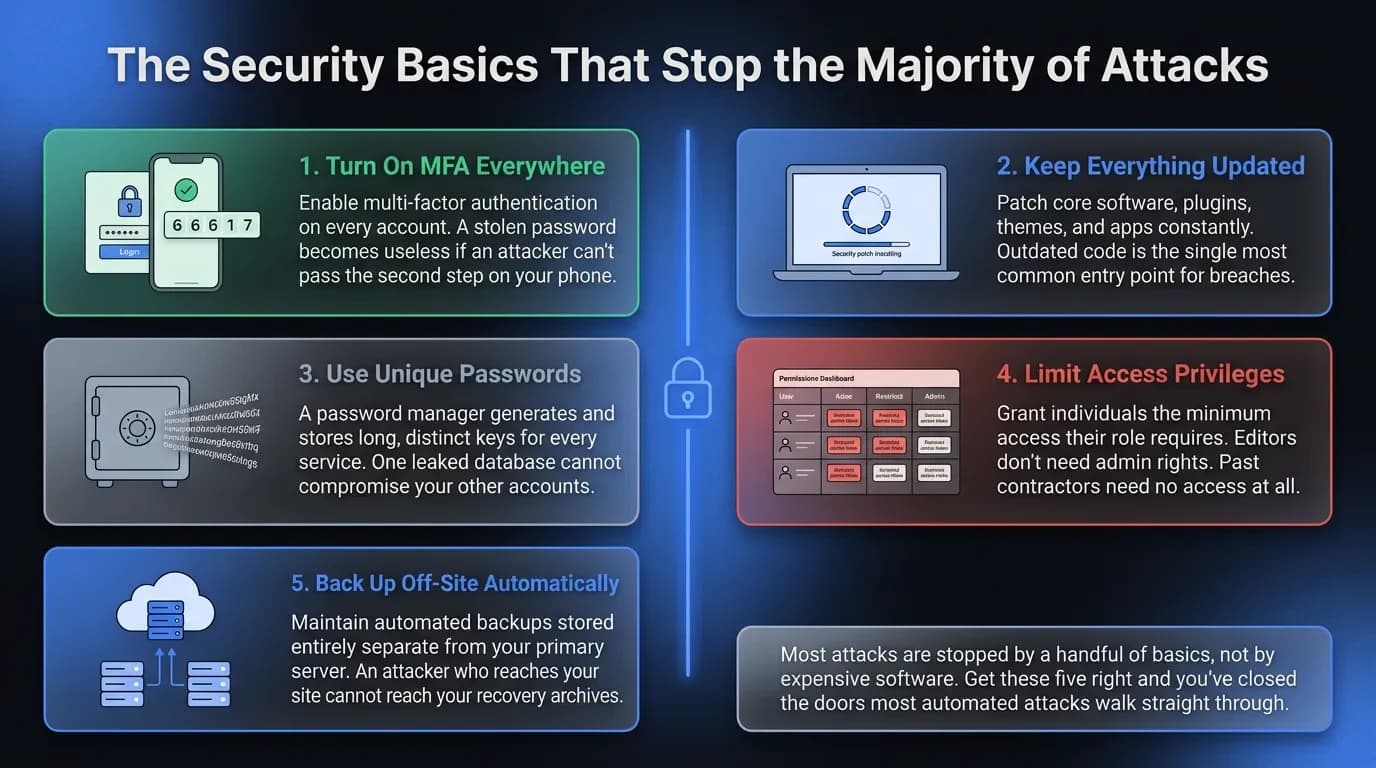
- Turn on multi-factor authentication (MFA) everywhere it's offered. A stolen password is useless if the attacker can't pass the second step on your phone. This is the single highest-value control you can enable, and it's almost always free.
- Keep everything updated. Core software, plugins, themes, and apps ship security patches constantly, and each patch is a public announcement of the flaw it fixes. Outdated software is the most common way sites get breached — turn on automatic updates wherever you can.
- Use a password manager and unique passwords. Reused passwords mean one leaked account unlocks all the others. A manager generates and stores long, random passwords so nobody has to remember or reuse them.
- Limit who can access what. Give each person the least access they need to do their job — the principle of least privilege. An editor doesn't need admin rights, and a contractor who left in March needs no access at all.
- Back up automatically, and store it off-site. When something goes wrong, a clean backup is the difference between a bad afternoon and a closed business. Stored off-site means an attacker who reaches your site can't reach your backups too — and test that you can actually restore it.
None of these require a specialist or a budget. All of them matter more than any single tool you can buy.
Add a Firewall and Malware Scanning Before You Need Them
The five fixes harden your front door. A web application firewall (WAF) decides who gets to walk up to it in the first place. A WAF filters out malicious traffic — injection attempts, brute-force logins, known bad bots — before it ever reaches your site.
For a small business, this rarely means hardware. Services like Cloudflare sit in front of your site and block bad traffic at the network level, and they work no matter what platform you're on. On WordPress, plugins like Wordfence or Sucuri bundle a firewall and malware scanning into one place. A free tier is enough to start; paid tiers add rate limiting and faster rule updates once you're handling payments.
Malware scanning matters because a breach is often invisible. Attackers inject code that redirects your customers to a scam, skims card details at checkout, or quietly sends spam from your server — sometimes for weeks before anyone notices. A scanner compares your files against known threats and flags changes you didn't make.
Pair the firewall with monitoring that alerts you when something shifts. The goal isn't to stare at logs all day. It's to learn about a problem within hours instead of months.
Close the Holes in Your Forms and Code
This is the layer most founder-facing guides skip, and it's where custom-built sites get hurt. Every input on your site — every search box, login, and contact form — is a door someone can try to pry open. The rule that prevents most of it is simple: never trust what a user types.
Two classic attacks exploit careless inputs. SQL injection slips database commands into a form field to read, change, or delete your data. Cross-site scripting (XSS) injects code that runs inside your visitors' browsers, hijacking their sessions or stealing what they enter.
The defense is input validation and sanitisation, which means your site treats user input as plain text and never as commands. On WordPress, Shopify, and other managed platforms, this is handled for you — as long as you don't bolt on sloppy custom code or an abandoned plugin. On a custom-built site, it falls to your developer to use parameterised queries and escape every output, every time. The same rule applies to file uploads, which should be restricted by type and never run as code.
Two more settings carry an outsized payoff. Add a CAPTCHA to public forms to stop automated abuse, and set a Content Security Policy (CSP) that controls which scripts your pages are allowed to load. Both take minutes and shut down whole categories of attack.
What Security Looks Like on WordPress, Shopify, and Custom Sites
The right moves depend on how your site is built. The principles stay the same; the work is different.
WordPress gives you the most control and the most responsibility. Its plugin ecosystem is also its biggest risk, because every plugin is code you're trusting with your whole site. Keep the plugin count low, update relentlessly, add Wordfence or Sucuri for firewall and scanning, and lock down the /wp-admin login page with limited login attempts and, ideally, IP restrictions. That admin page should never be casually exposed to the public internet.
Shopify, Wix, and Squarespace handle much of the heavy lifting for you. SSL, server patching, and platform-level protection come built in, which is the trade-off for having less control. Your job shifts almost entirely to account security: strong passwords, MFA on every admin login, careful staff permissions, and vetting any third-party app before you install it — a malicious app is a supply-chain risk you invited in.
Custom-built sites are exactly as secure as the team that built them. There's no platform quietly catching your mistakes, so security has to be designed in from the start: hardened hosting, validated inputs, encrypted connections, and a real update process for every dependency. This is where the cheapest build often turns into the most expensive one. Whatever you run, the question is the same — who owns each layer, and do they know it?
What Website Security Costs a Small Business
The good news: the highest-impact controls are free or close to it. MFA, updates, a password manager, least-privilege access, and a Let's Encrypt SSL certificate cost nothing but attention. Most of your security comes from habits, not invoices.
So where should you actually spend? A reputable host is worth paying for, because good hosting bundles patching, backups, and uptime into one bill — expect a few hundred dollars a year for a small business site. A firewall and scanning service is a reasonable monthly cost once you handle customer data or payments, often somewhere between ten and forty dollars a month depending on the platform.
On SSL specifically, owners constantly ask whether the free certificate is "enough." For the overwhelming majority of sites, a free Let's Encrypt certificate provides identical encryption to a paid one. You only need a paid OV or EV certificate when you want a verified organisation name attached to it — useful in some financial or enterprise contexts, and unnecessary for most.
Spend on the things that fail quietly: hosting, backups, and monitoring. Skip the security theatre that sells fear by the month without measurably reducing your risk.
What to Do the Day Your Site Gets Hacked
Plan for this now, because the worst time to figure it out is in the middle of it. A calm, written response turns a breach from a catastrophe into a manageable incident.
- Contain it. Take the site offline or into maintenance mode so the damage stops spreading and your customers aren't exposed to it.
- Restore from a clean backup — the off-site copy you tested, taken from before the breach happened.
- Change every credential. Admin logins, hosting, database, email. Assume all of them are compromised, because they may be.
- Find out how they got in. Scan for malware and check your logs, or bring in help. Restoring without closing the hole just invites them straight back.
- Notify anyone affected. If customer data was exposed, telling people is often a legal obligation — and always the right call for keeping their trust.
Write these steps down before you need them, and note exactly who to call. An incident response plan you wrote calmly is worth ten decisions made in a panic.
Build Security In From the First Line of Code
The most secure sites aren't the ones with the most plugins. They're the ones where security was a design decision, not a patch applied after launch. Backups, validated inputs, a sane permission model, and automated certificates are far cheaper to build in than to bolt on after something breaks.
If you're launching or rebuilding and want this handled properly from the ground up, here's how we approach a web project at Vediwood. We scope it, build it, and explain every decision along the way — no jargon, no surprises, and security that's there from the first line of code.
Follow Us
Most founders read us once and change something that week.
Every issue covers one thing that makes your website work harder — better conversion, stronger SEO, or smarter design. No fluff, no agency speak. Just the decision you need to make this week.
Our Team

Sadiki Said
Full Stack Developer

Nezha Essyed
Content Strategist