A headless CMS for business is worth it when your content needs to live in more than one place — a website, an app, a kiosk, a customer’s inbox — and it’s usually overkill when it doesn’t. That’s the honest answer, and most articles bury it under jargon or a sales pitch. Headless sounds like a developer problem, but the decision behind it is a business one. We build on a headless setup every day at Ve
diwood, and we’ve also talked clients out of it. Here’s how to know which side of that line you’re on.
What a Headless CMS Actually Is
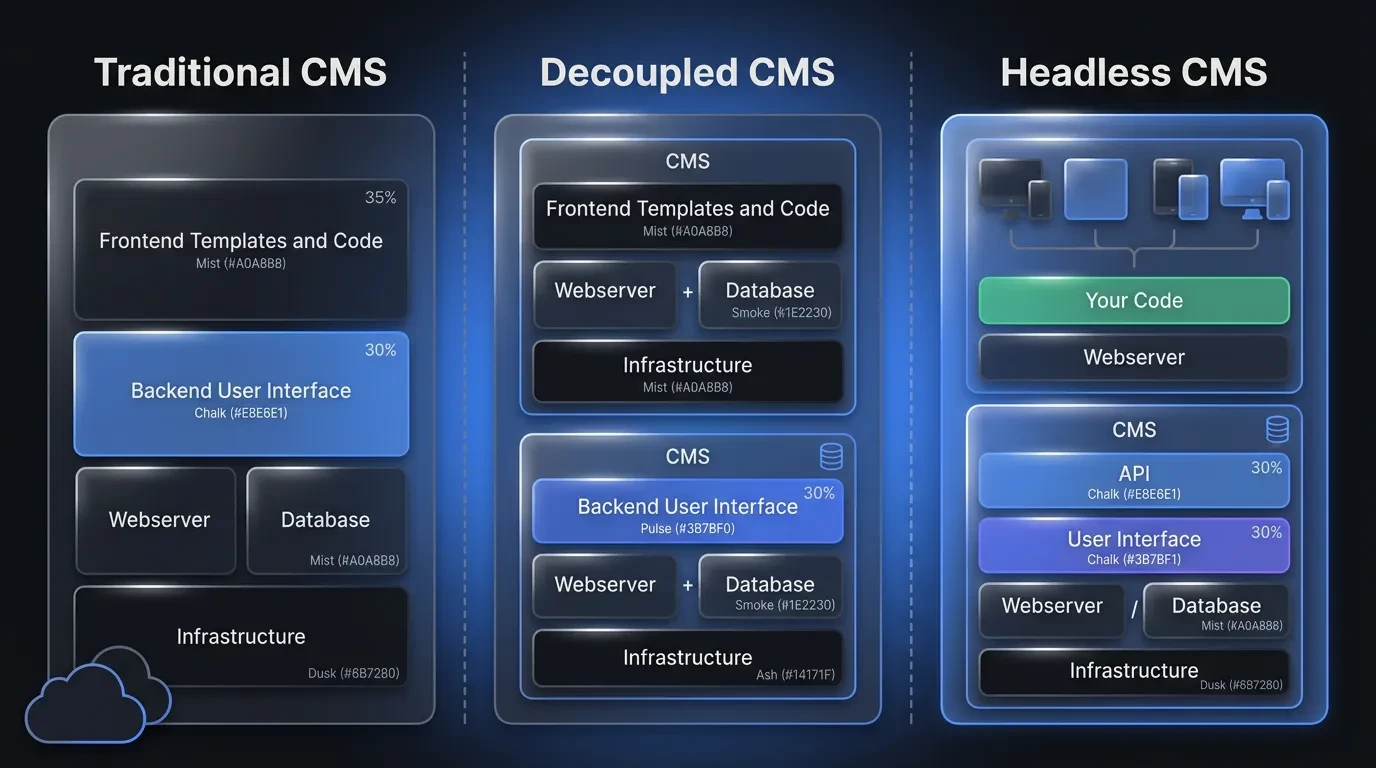
A headless CMS is a content management system that stores your content separately from the design that displays it. The “head” is the front end — the website or app your customers actually see. A headless system removes that head and serves your content through an API, so any number of front ends can pull from one source.
Compare that to WordPress, where content and design are welded together. In a traditional setup, a blog post only exists as a web page. In a headless setup, that same post is raw, structured data — ready for a website today and a mobile app tomorrow.
Think of it as the difference between a printed photo and the digital file behind it. The print is fixed at one size, on one paper, forever. The file can become a print, a billboard, a phone wallpaper, or a thumbnail — same source, many outputs.
Here is what that looks like for a real business. Say you run a fitness studio with a website, a booking app, and screens in the lobby. With a headless setup, your class schedule is one piece of content that feeds all three — change a time once and every screen updates.
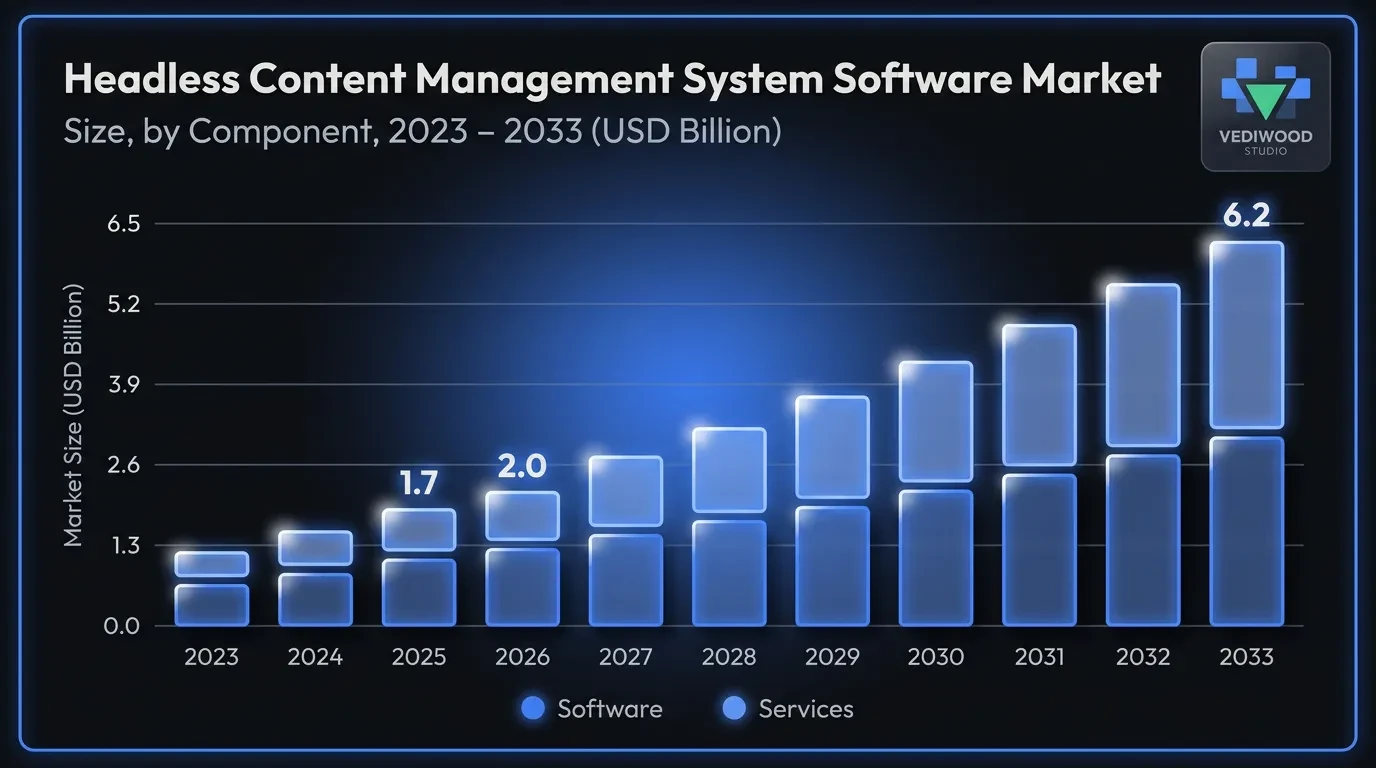
That shift is not a fringe trend. The headless content management market was valued at USD 1.75 billion in 2025 and is projected to reach USD 6.23 billion by 2033, according to Grand View Research. Founders are not switching for fun — they are switching because their content has more jobs to do.
Headless vs. WordPress: What Actually Changes
Most founders know WordPress, so that is the fairest comparison. WordPress is a traditional, or “monolithic,” CMS — the editor, the database, and the public site are one connected system. It works, and for a simple brochure site it works well.
The trouble starts when your content has to go somewhere other than that one website. A WordPress post is built to be a page, so reusing it inside a mobile app or a point-of-sale screen means copying, pasting, and maintaining the same words in three places. In a headless system, you write it once and every channel reads from the same record.
There is also a speed and security difference baked into the architecture. A traditional CMS renders pages on a server every time someone visits, which adds load time and exposes more of your system to attack. A headless front end is usually pre-built and served from a fast global network, with the editing system hidden away from the public internet.
The trade is real, though. WordPress gives a non-technical owner a ready-made theme and thousands of plugins, while headless asks you to build the front end yourself. You gain flexibility and lose the out-of-the-box shortcut — which is exactly why the decision depends on your business, not on which option is “better.”
There is one more difference founders feel later: lock-in. With a monolithic platform, your content, design, and hosting are tangled together, so moving away means rebuilding everything. With headless, the content sits in its own layer, so you can change your front end, your framework, or your host without touching the content itself.
Headless CMS vs. Decoupled CMS: A Quick Clarification
While you research this, you will run into a third term — “decoupled CMS” — and it causes real confusion. The short version: a decoupled CMS also separates content from code, but it still ships with a front end attached. A headless CMS has no front end at all and leaves that entirely to you.
In practice, decoupled is a halfway step. Some traditional platforms bolted an API onto their old system and rebranded it as decoupled, which gives you some flexibility while keeping a default website ready to go.
For most businesses the distinction matters less than the marketing makes it sound. What you actually care about is whether content is structured and available through an API — and both headless and decoupled give you that. Choose based on whether you want a front end handed to you or built to fit.
How a Headless CMS Works, Without the Jargon
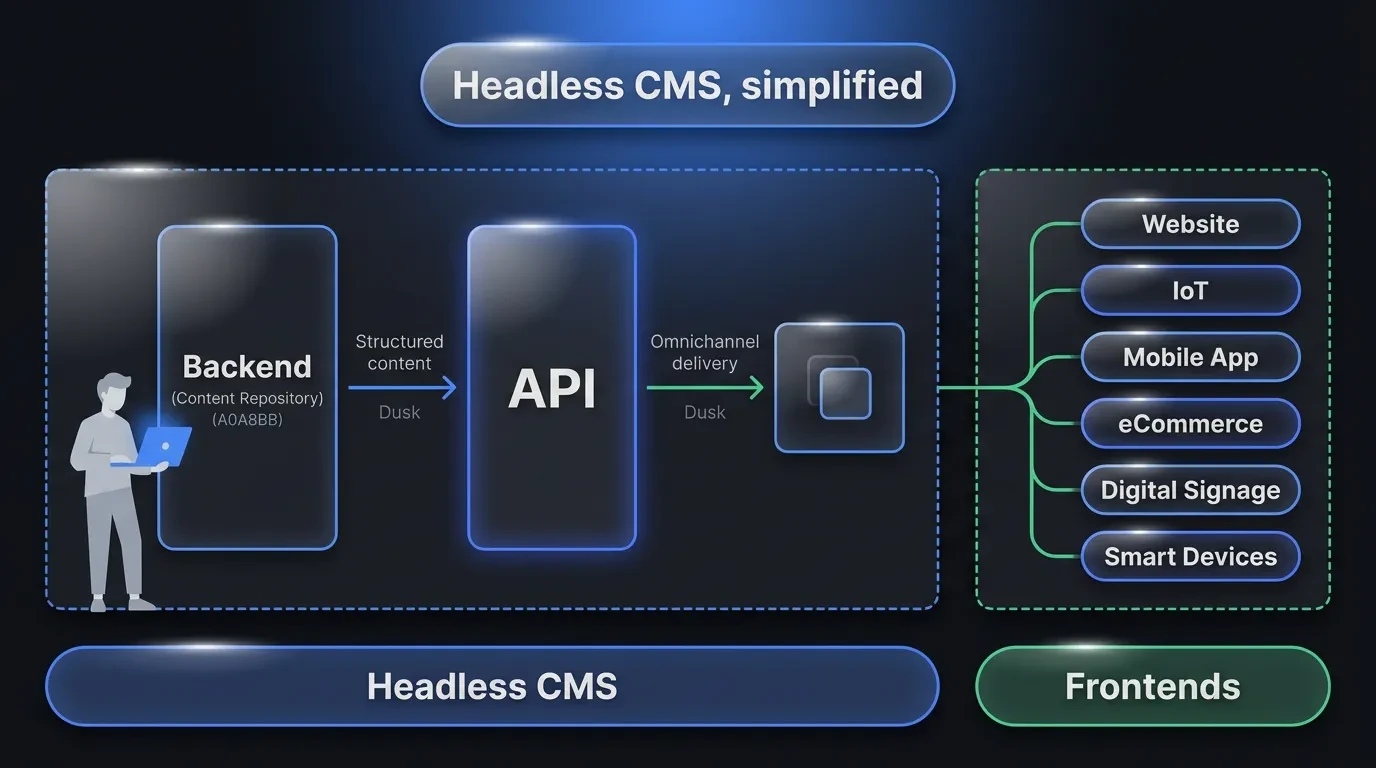
Three pieces do the work, and you only need to understand what each one is for. The first is the editing interface, where your team writes and updates content. The second is the content model, which defines the shape of your content — a product has a name, price, photo, and description, for example.
The third piece is the API. An API is just a delivery hatch: your website, app, or any other tool asks the headless CMS for content, and the CMS hands it over as clean data. The front end then decides how to display it.
Here is the flow in plain terms. An editor updates a product price in the CMS. The moment a customer opens your site or app, the front end requests the latest data through the API and shows the new price. No one rebuilds a page by hand, and the same request works whether the front end is a website, an app, or a smart display.
This is why headless content is sometimes called structured content — it is broken into labelled fields instead of one blob of formatted text. Structure is the part that makes reuse possible, because a field called “price” can be dropped into a web page, an app, and an email without anyone retyping it. Get the structure right early and the rest of the system becomes far easier to grow.
The Real Benefits of a Headless CMS for Business
The benefits of a headless CMS for business come down to five things you can actually feel: speed, reach, security, scale, and a calmer editing experience. None of them are abstract. Each one maps to a cost you are probably already paying.
Your site gets faster
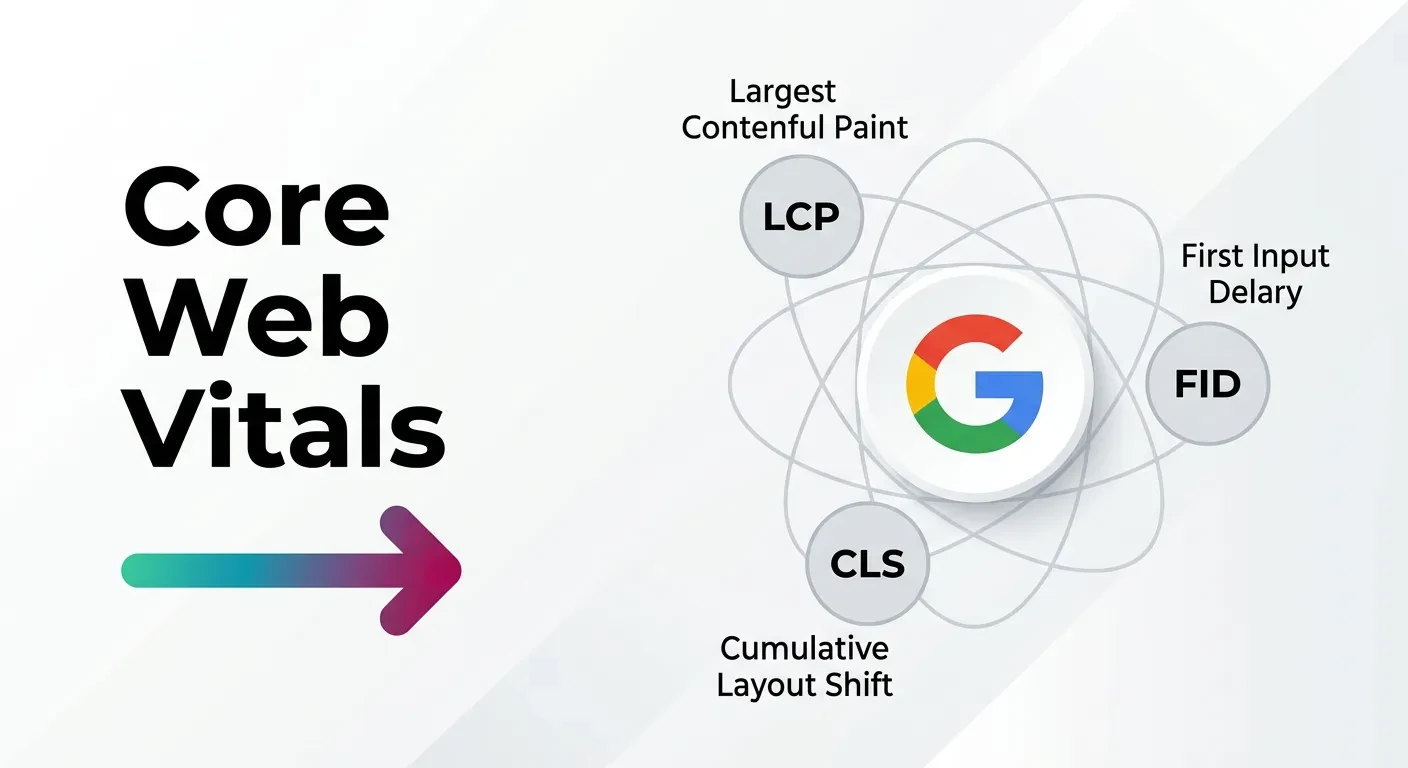
Because a headless front end can be pre-built and served from a content delivery network, pages load faster than a server rendering them on demand. Speed is not vanity — it is a ranking and revenue factor. Google treats loading, interactivity, and visual stability as page-experience signals through its Core Web Vitals, and faster pages convert more visitors into customers.
For an e-commerce business, that speed is money. Slow product pages lose impatient buyers before they ever see the “add to cart” button, and shaving a second off load time can lift conversions measurably.
One source feeds every channel
Write a product description once and it can appear on your website, in your app, and on an in-store screen at the same time. When you change the price, it changes everywhere. This “create once, publish everywhere” model is the single biggest reason businesses go headless.
It also removes a whole category of human error. When content lives in one place, you never get the situation where the website says one price and the app says another because someone forgot to update both.
A smaller target for hackers
The public side of a headless site has no live database or login screen attached to it. There is simply less surface for an attacker to reach. For a business that handles customer data, that reduced exposure is worth real money in avoided risk.
It also means fewer emergency patches. A plugin-heavy WordPress site is a constant security chore, while a headless front end has far less to keep locked down.
It grows with you instead of against you
A headless CMS does not assume your content is a website forever. When you add a mobile app, a partner portal, or a new regional site, the content is already structured to feed it. You extend the system rather than rebuild it.
This is the quiet long-term win. The system you launch this year can still be the system you run in five years, even as the channels around it change.
Editors stop fighting the page
A good headless editor gives your team clean, predictable fields instead of a fragile page builder. Content people update content without filing a developer ticket, and developers stop being a bottleneck for copy changes. Both sides do the work they are actually good at.
The result is fewer “can you just change this one line” requests landing on your developer’s desk, and faster updates for everyone.
When a Headless CMS Is Overkill for Your Business
Here is the part the vendor sites leave out: headless is often the wrong call. If your business is a single marketing website with a handful of pages that rarely change, you do not need this. A well-built WordPress or static site will serve you better and cost less.
The signal to watch is how much your content actually moves. As one developer put it bluntly on Reddit, if your site is “90% static content with a few things that change,” a headless CMS adds complexity you will never use. Founders also hit a quieter problem — some headless plans cap how many content items you can store, which bites a small business with lots of little records.
Headless earns its place when content has more than one home or more than one team touching it. A local restaurant with one site does not qualify. A growing e-commerce brand with a web store, an app, and seasonal campaign pages absolutely does.
A quick gut check — headless is probably overkill if most of these are true:
- Your content lives only on one website and you have no plans to change that.
- Your pages rarely change and you have no dedicated content team.
- You need to launch fast and cheap with a ready-made theme.
- You have no developer and no budget to build a custom front end.
So before you migrate, answer one question honestly: where does this content need to go in the next two years? If the answer is “just this website,” save your money. If the answer is “places I can’t fully predict yet,” headless is the safer bet.
Does Going Headless Hurt Your SEO?
This is the fear we hear most, and the short answer is no — done right, headless helps SEO more than it hurts it. The myth comes from the early days, when JavaScript-heavy front ends sometimes shipped pages search engines struggled to read.
That problem is largely solved. Google renders JavaScript and documents exactly how to build crawlable pages in its JavaScript SEO guidance. The fix is to serve pre-rendered or server-rendered HTML, which modern frameworks like Next.js do by default.
Where headless quietly wins is performance and structure. Faster pages, clean structured data, and full control over metadata are all easier to deliver when the front end is yours to shape. The risk is not the architecture — it’s hiring someone who treats SEO as an afterthought.
The pitfalls are real but avoidable. The common ones are shipping client-only rendering with no fallback HTML, forgetting to set titles and meta descriptions per page, and breaking URL structures during a migration. Each of these is a build decision, not a flaw in headless itself. Build it in from the first line of code and a headless site competes hard in search.
What a Headless CMS Really Costs
Cost has three parts, and the platform fee is usually the smallest one. Most headless CMS tools have a free or low-cost tier for small projects, then scale into monthly plans that often run from tens to a few hundred dollars a month as your content, users, and API calls grow. Watch the pricing tiers carefully — some jump sharply once you pass a usage limit, the “price cliff” experienced teams warn about.
The bigger cost is the front end. Because headless gives you no built-in theme, someone has to design and build the site or app that displays the content. That is a one-time development investment, and it is the real reason headless is not a fit for a tiny brochure site.
The third cost is ongoing maintenance, which is genuinely lower. With less to patch and fewer plugins to break, a well-built headless site tends to need less firefighting than a plugin-heavy WordPress install. You pay more up front and less over time — which suits a business planning to grow, not a one-off page.
For a realistic budget, think of it as a custom build rather than a template. You are buying a system that fits your business, and the payoff is a site that does not need a full rebuild every two years. The cheapest option on day one is rarely the cheapest option over five.
How to Choose the Right Headless CMS
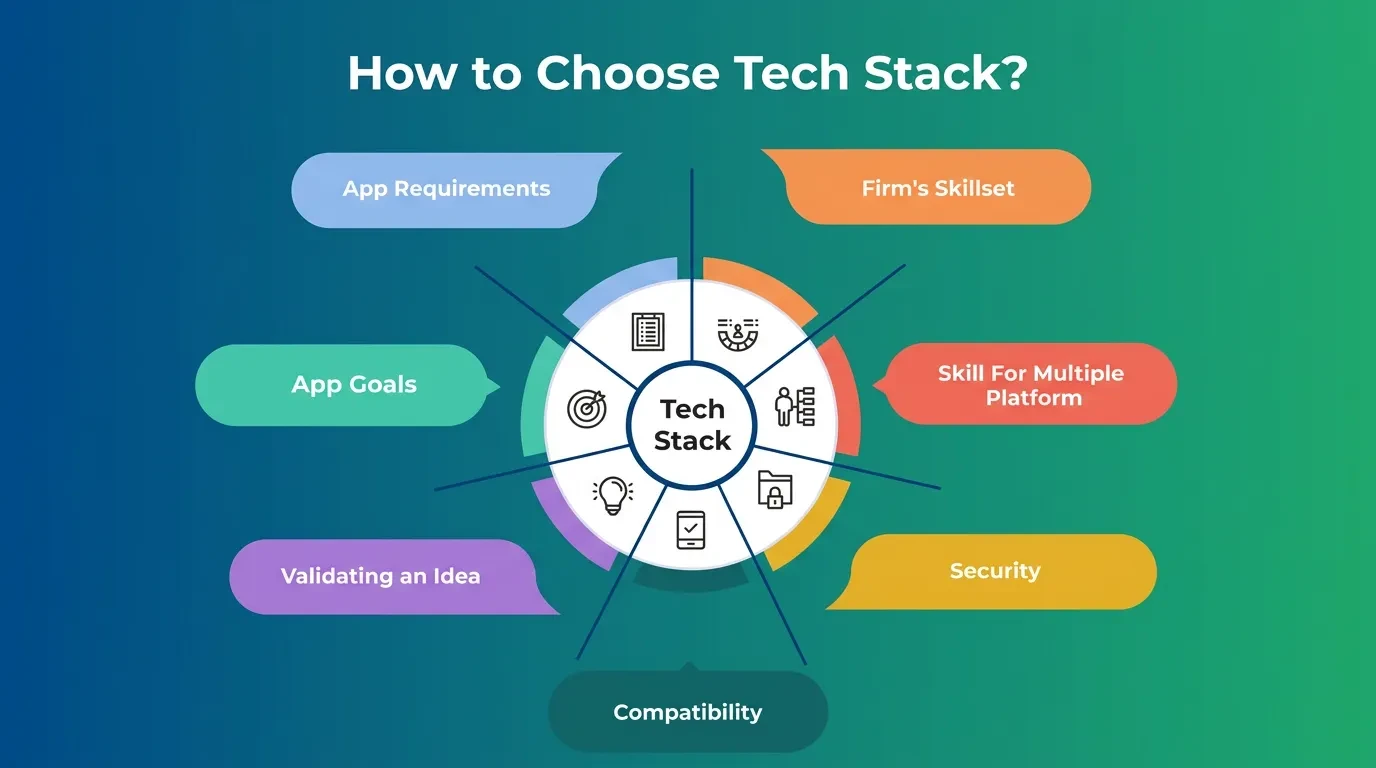
There is no single best option — there is the one that fits how your team works. Start with these questions before you look at any logo: Can it model the content structures you actually need? Will non-technical editors find it usable? Does the pricing scale without a sudden cliff? And does it play well with the framework your developers use?
The landscape sorts into a few clear groups. Sanity, Contentful, and Storyblok are mature, hosted platforms strong on editor experience and scale. Strapi and Payload are developer-first and open-source, which appeals if you want to self-host or keep full control of your data. Lighter tools exist too, but most growing businesses are choosing between those two camps.
Hosted platforms take the infrastructure off your plate — someone else handles security, scaling, and uptime — in exchange for a monthly fee and less control over where your data lives. Open-source, self-hosted options flip that: you own everything and pay less in licensing, but your team carries the responsibility for keeping it running.
A few practical filters cut the list fast:
- Editor experience — if your marketing team lives in the CMS daily, prioritise a clean editing interface over raw flexibility.
- Framework fit — some tools strongly favour React and Next.js, so match the CMS to your stack to avoid friction later.
- Hosting model — hosted SaaS means less to manage; self-hosted open-source means more control and more responsibility.
- Pricing shape — model your real content volume against the tiers, not the headline free plan.
The goal is a CMS you can grow into, not one you outgrow in a year. We build most client projects on Sanity because its structured-content model and customisable editor hold up as a business scales, but the right answer is always the one matched to your team and budget — not ours.
What We’ve Learned Running on a Headless CMS
A few lessons only show up after you have shipped real projects on this architecture. The first: the content model is everything. Time spent early defining clean, reusable fields pays back tenfold, while a rushed model becomes the thing you fight for years.
The second lesson is that editors decide whether the project succeeds. A technically perfect setup fails if the people writing content find it confusing. We spend real effort shaping the editing experience so a non-technical team can update the site without calling us.
We also learned to resist over-modelling. It is tempting to build a field for every imaginable future need, but that buries editors in options they never use. The better path is to model what the business needs now and extend the structure as real requirements appear.
The third is honesty about scope. We have moved e-commerce and media clients to headless and watched it transform how fast they ship, and we have also told smaller clients to stay on a simpler stack. The best technical decision is the one that matches the business — even when it means a smaller project for us. That is the difference between a studio that explains every decision and a vendor selling one product.
How to Move to Headless Without Breaking What Works
You do not have to rebuild everything in one weekend. The safest migrations are phased, and they start with an audit of your existing content. Map what you have, decide what is worth keeping, and design the content model around your real needs before touching code.
From there, the order matters. Build the content structure first, migrate your content into it, then build the new front end and connect the two. Keep the old site live until the new one is tested, then switch over and set up redirects so your search rankings carry across.
A realistic timeline for a small-to-mid business is a few weeks to a couple of months, depending on how much content you have and how clean it is. The audit and content modelling take longer than people expect, and the build moves quickly once the structure is solid.
The most common mistake is migrating a messy site as-is. A migration is the best chance you will ever get to fix your content structure — use it. Done in stages, the move is far less risky than the all-at-once rebuild founders fear, and you keep the traffic and rankings you have already earned.
Headless CMS for Business: Quick Answers
Is a headless CMS good for a small business? Sometimes. It is a strong fit for a small business that publishes across a website and an app, and the wrong fit for a simple one-page site that rarely changes.
Can I use a headless CMS without a developer? Not really. You need a developer to build and connect the front end, though once it is built, non-technical editors can manage content easily.
Will I lose my Google rankings if I switch? Not if the migration is handled properly. Set up redirects, keep your URL structure intact, and serve crawlable HTML, and your rankings carry over.
Is headless more secure than WordPress? Generally, yes. With no public database or login screen attached to the front end, there is less for an attacker to target and less to patch.
Build on Content That Outlasts Your Next Redesign
A headless CMS is not a trend to chase — it is a decision about whether your content needs to outgrow a single website. If it does, the architecture pays for itself in speed, reach, and a system you extend instead of rebuild.
If you are weighing whether headless is right for your business, that is exactly the conversation we have before we write a line of code. See how Vediwood approaches a web project — we scope it, explain every decision, and tell you honestly when a simpler stack would serve you better.
Follow Us
Most founders read us once and change something that week.
Every issue covers one thing that makes your website work harder — better conversion, stronger SEO, or smarter design. No fluff, no agency speak. Just the decision you need to make this week.
Our Team

Sadiki Said
Full Stack Developer

Nezha Essyed
Content Strategist