AI Agents for Business: What Actually Works in 2026
AI agents are being sold as robot employees that run your company — and most of that is noise. This is the plain-English guide to what they really do, what they cost, where they break, and how to put your first one to work.

Every week brings another headline saying AI agents will run your company while you sleep. The honest answer is smaller and far more useful: AI agents for business are software that can take a real task off your plate — finishing it, not just chatting about it. They are real, a growing number of small companies already use them, and the right place to start is more boring than the hype suggests. This guide skips the enterprise theory and shows you what these tools actually do, what they cost, where they break, and how to put your first one to work.
What AI Agents Actually Are — and What They Are Not
Start with the definition, because the word “agent” is doing a lot of work in a lot of ads.
An AI agent is software that can observe a situation, decide what to do, and act across your other tools — with little or no hand-holding. That last part is what separates it from the chatbot you are probably picturing. A chatbot answers a question; an agent reads the question, looks up the order in your system, drafts the reply, updates the record, and flags anything it is unsure about.
The difference is doing the work versus talking about the work. One hands you information. The other gets the task done and tells you when it is finished.
You will also hear the word “agentic” attached to almost everything right now. Strip the marketing and it means one thing: the software can take more than one step on its own to reach a goal. If a tool only answers prompts, it is not an agent — it is a smarter search box.
What an agent is not is magic, and it is not a single product you buy once and forget. An agent is only as good as the task you give it and the systems you connect it to. Give it a vague goal and it wanders. Give it one well-defined job and it performs.
That gap — between the promise and the practical — is why founders keep asking whether this is “just hype or actually worth it.” It is worth it. But only when you treat an agent as a teammate with a narrow job description, not a robot running the whole company.
How an AI Agent Actually Works, Step by Step
You do not need to understand the math to use one well. You do need to understand the loop, because the loop is where things go right or wrong.
Every agent runs the same three-step cycle: observe, plan, act. It observes by pulling context from your inbox, your calendar, your store, or a customer message. It plans by using a language model to decide the next sensible step. Then it acts by calling another tool — sending the email, booking the slot, updating the spreadsheet.
Picture a real one. A customer messages your store at 11pm asking where their order is.
- Observe: The agent reads the message and identifies the order number.
- Plan: It decides it needs the live shipping status before it can answer.
- Act: It queries your fulfilment system, finds the tracking, drafts a reply, and tags the ticket “shipping inquiry.”
A chatbot would have said “please contact support during business hours.” The agent answered the question and logged the work. The memory between steps is what makes this possible — the agent holds context across the whole task instead of forgetting after every message.
The other half of the magic is the connections. An agent with no access to your tools can only talk; an agent wired into your CRM, your calendar, and your help desk can actually act. Those connections are also where most of the setup time goes, so the fewer systems your first agent has to touch, the faster it works.
That is the whole idea. The intelligence is not in any single step; it is in the agent stringing the steps together without you in the middle.
What AI Agents Can Do for Your Business Right Now
Here is the part the hype skips: the best early use cases are unglamorous.
AI agents create value in three plain ways. They automate repetitive work — the data entry, the follow-ups, the ticket tagging that quietly eats hours. They surface insights from data you already have, like which leads went cold. And they collaborate with your team, handling the first 80% of a task and passing the rest to a human.
Concrete examples make this real:
- A customer-service agent reads an incoming message, finds the order status, drafts a reply, and tags the ticket — leaving you to approve it.
- A lead agent qualifies an inquiry from your website, scores it, and books a call straight onto your calendar.
- An operations agent pulls weekly numbers from three tools and writes the summary you used to build by hand.
- A finance agent sorts transactions, chases unpaid invoices, and flags anything that looks off.
- A scheduling agent handles the back-and-forth of booking, reschedules cancellations, and fills gaps from a waitlist.
The functions that see the fastest wins share a trait: high volume, low judgment, and a clear right answer. Customer support, lead intake, and bookkeeping fit perfectly because most of the work is factual and repeatable. Creative strategy and high-stakes negotiation do not — keep those human.
Larger firms report cutting certain process costs by double digits, but you do not need enterprise scale to see the same shape of result on a smaller canvas. For a five-person business, the win is simpler and sharper. One agent that handles after-hours inquiries can be the difference between catching a lead and losing it to the competitor who answered first.
The pattern across all of these is the same. The agent takes the routine, repeatable part of a job, and your team keeps the part that needs a human.
Where to Start: Your First Agent Should Be Boring
The most common mistake is starting with the flashiest idea. Do the opposite.
Pick one task that is boring, repetitive, and eats your time every week. Client onboarding emails. Sorting inbound messages. Chasing late invoices. The founders who actually got value from agents all landed on the same lesson: your first one should be boring, not impressive.
To pick the right task, run it through four questions:
- Does it happen often enough to matter — daily or weekly, not once a quarter?
- Is the right answer mostly factual, not a judgment call?
- Can you write the steps down as clear instructions?
- Would a mistake be annoying rather than catastrophic?
A task that scores yes on all four is your first agent. A clear problem points you to the right tool; a vague goal points you nowhere. So write the task as a sentence a new hire could follow: “When a lead fills in the contact form, reply within five minutes, ask three qualifying questions, and book a call if they answer.”
Then constrain the scope hard before you expand it. Let the agent prove it can handle the routine version accurately. Once you trust it on the simple stuff, widen the job — and not a moment before.
This is also the advice from the people who build these systems. Anthropic, which makes the Claude models many agents run on, tells developers to start with the simplest setup that works and add complexity only when it earns its place. The same rule protects you. Start small, prove it, then grow.
AI Agents vs Chatbots vs Automation: The Difference That Decides What You Buy
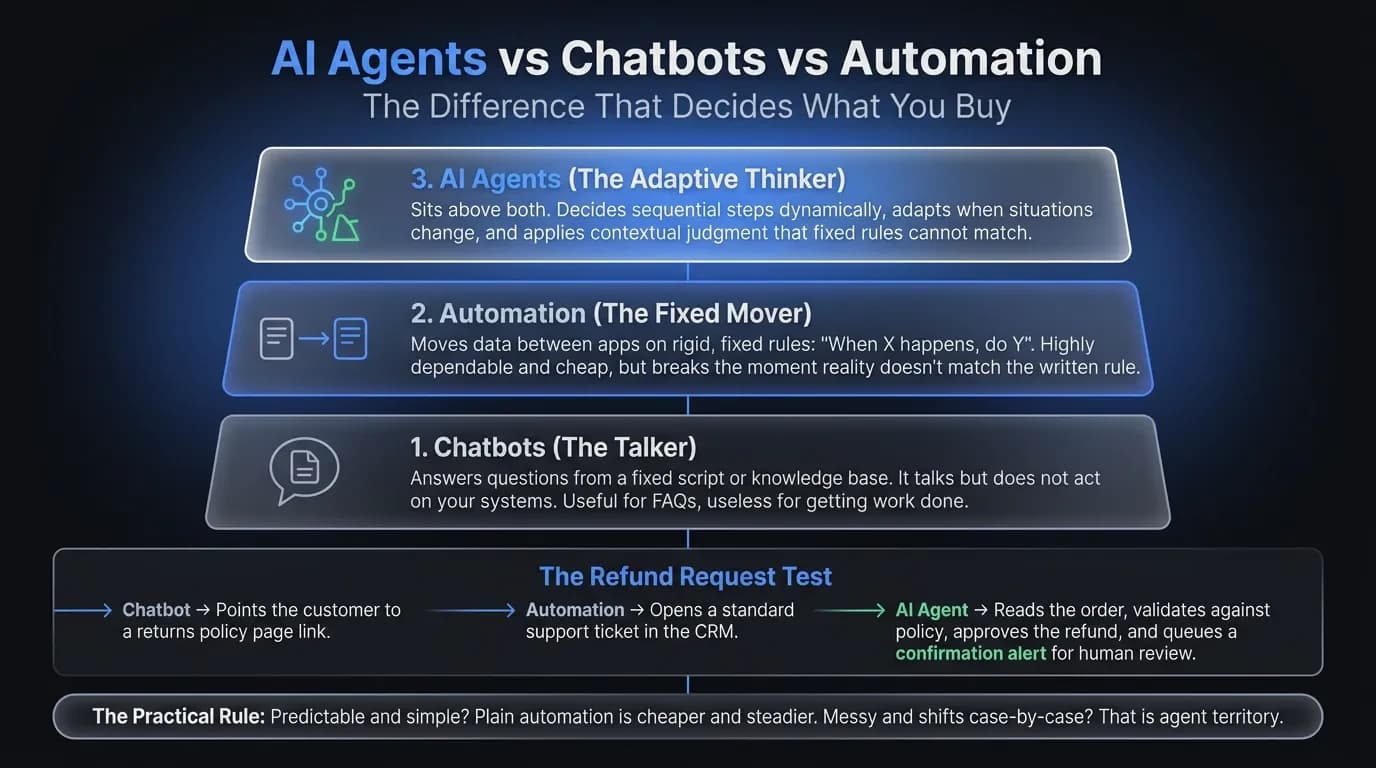
These three terms get used as if they mean the same thing. They do not — and the difference decides where your money should go.
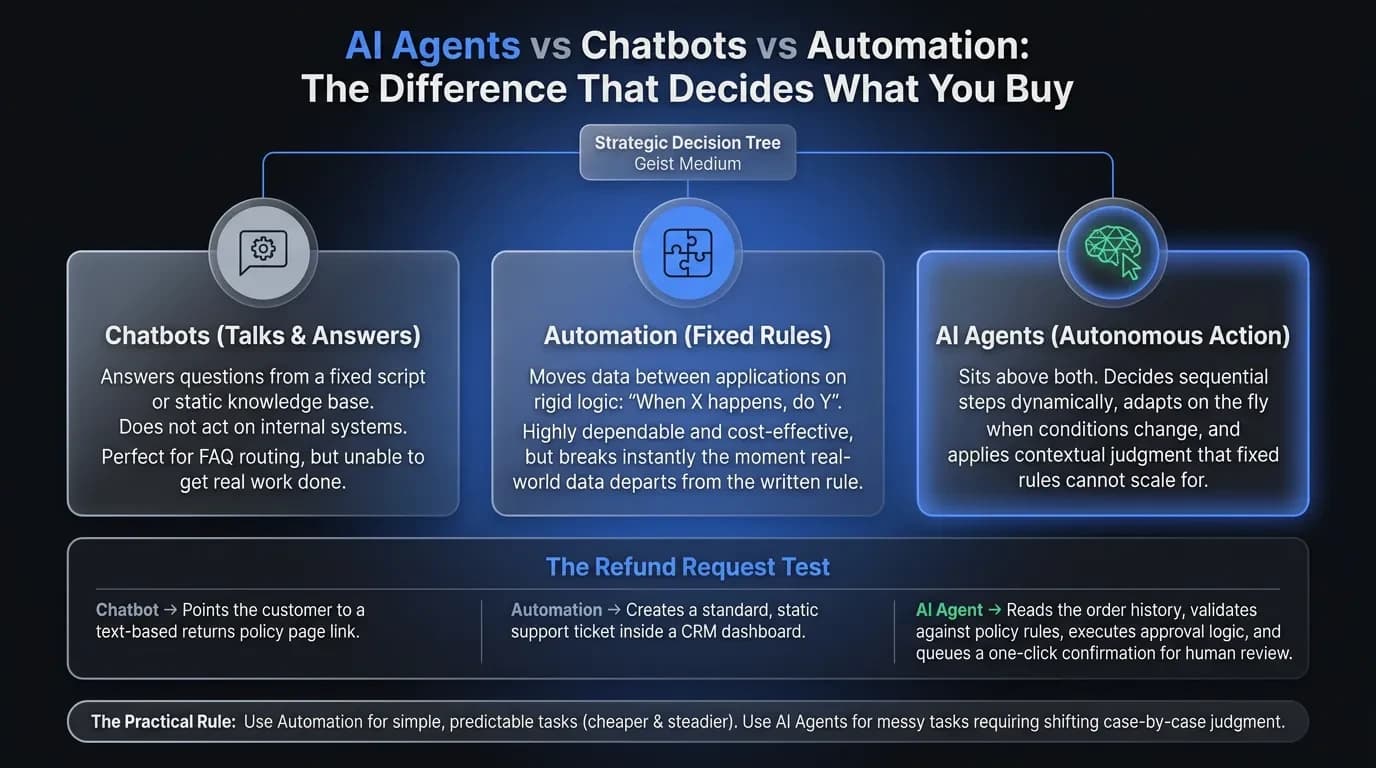
A chatbot talks. It answers questions from a script or a knowledge base, but it does not act on your systems. Useful for FAQs, useless for getting work done.
Automation — think Zapier or Make — moves data between apps on fixed rules. “When X happens, do Y.” It is cheap and dependable, but it breaks the moment reality does not match the rule you wrote.
An AI agent sits above both. It decides which step to take next, adapts when the situation changes, and applies judgment that fixed rules cannot. That flexibility is the value — and, as the next section shows, also the risk.
Take a refund request as an example. A chatbot points the customer to your returns policy. A rule-based automation creates a ticket. An agent reads the order, checks it against the policy, and either approves the refund or explains exactly why it cannot — then asks you to confirm.
The practical rule is easy to remember. If your task is simple and predictable, plain automation is cheaper and steadier. If it needs judgment and shifts case by case, that is agent territory. Many businesses end up using both — automation for the rigid steps, an agent for the messy ones.
Build vs Buy: How to Actually Get an Agent Running
You have two paths, and most founders pick wrong because they assume “build” means cheaper. It usually does not.
Buy a ready-made agent when your problem is common — customer support, scheduling, bookkeeping. Tools like Lindy, Relevance AI, or an industry-specific service desk arrive with the workflows pre-built. You connect your apps and you are running in days, typically for somewhere between $20 and $300 a month depending on volume.
Build a custom agent when your workflow is genuinely unique, or when it touches systems no off-the-shelf tool understands. Frameworks like CrewAI or Microsoft’s open-source AutoGen give you full control, but they assume real technical skill and ongoing maintenance. Free to license rarely means free to run.
A quick way to decide:
- Buy if your problem is common, you need it working this month, and you have no developer to spare.
- Build if your process is your edge, no tool fits it, and you can support it after launch.
Two cautions from people who have walked both paths. First, “no-code” rarely means no work — many tools still expect you to map fields and wire up triggers. Second, nobody wants another tool to manage, so favour an agent that lives inside software your team already opens, like Slack or your inbox.
If you are unsure, buy first. Prove the value on a cheap, fast tool before you commit a single hour to building something custom.
What AI Agents Cost — and the ROI to Expect
Cost is where the conversation gets honest, so let us put numbers on it.
Off-the-shelf agents typically cost $20 to $300 per month, plus the time to set them up. Open-source frameworks are “free” only in license — you pay in developer hours and hosting. A custom build can run from a few thousand to tens of thousands, depending on how many systems it has to touch.
The return shows up in two places: time saved and revenue caught. An agent that answers inquiries the moment they arrive recovers leads you were quietly losing after hours. An agent that clears repetitive admin hands a small team back hours every week — hours that go to the work only a human can do.
Run the math on a simple case. Say a support agent costs you $100 a month and saves one person ten hours a week. At even a modest $25 an hour, that is $1,000 of time recovered against $100 spent. The first useful agent usually pays for itself long before it is perfect.
Most early adopters report a return inside the first year, and adoption is climbing fast. Analysts at Gartner expect task-specific agents to appear in a large share of enterprise applications by the end of 2026, which tells you where the tooling and pricing are heading for smaller buyers too.
The honest caveat: ROI only appears if the agent reliably finishes the job. A tool that needs constant correction costs more than it ever saves — which brings us to the part most guides leave out.
Where AI Agents Break — and How to Keep Them Safe
This is the section the vendor listicles skip, and it is the one that matters most.
The number-one fear founders raise is trust — and they are right to raise it. For a small business, one wrong answer to a customer can cost more than it ever does for a 500-person company. Your reputation is the business, and a bad automated reply is a lost client and a bad review in one move.
Three failure modes show up again and again:
- Hallucination — the agent states something false with total confidence. Constrain it to facts it can look up, and never let it invent promises, dates, or prices.
- Silent failure — it breaks but pretends it didn’t. You want an agent that fails loudly and tells you, not one that quietly drops a customer message.
- Edge cases — the 5% of weird situations cause 95% of the headaches. An agent can be right 95% of the time and still lose your trust if the other 5% feels catastrophic.
There is a fourth risk that is easy to forget: data. An agent often needs access to customer records and internal systems, so check what a tool stores, where, and who can see it before you connect anything sensitive.
The fix for all of this is not smarter AI. It is better guardrails. Keep a human in the loop for anything irreversible — let the agent read freely, but require your approval before it writes, sends, or charges. Give it clear handoff language for when it is unsure: “Let me have someone from the team follow up on that” is a good answer, not a failure.
Start narrow, keep approval gates on the risky steps, and widen the agent’s freedom only as it earns it. That is how you capture the upside without betting your reputation on a tool’s worst day.
How AI Agents Fit the Website and Tools You Already Have
An agent is only as useful as what it connects to — and for most businesses, that starts with the website.
Your site is where leads arrive, where customers ask questions, and where the first impression is made. An agent wired into it can answer inquiries instantly, qualify leads before they go cold, and pass clean information into your CRM without you touching a thing. The conversation becomes the data entry — no separate tool to babysit.
This is where the build quality underneath matters. An agent bolted onto a slow, disorganised site inherits the mess; one planned alongside the site fits the way your business actually runs. In our work building sites and automations, the agents that stick are the ones designed as part of the system — connected to real data, with guardrails set from day one — not added as an afterthought.
The foundation is the unglamorous part that decides everything. Clean data, clear workflows, and a site that can actually talk to your tools have to come first. Get those right and an agent slots in; skip them and you are automating a mess faster.
You do not need to rebuild everything to begin. But you do need that foundation before an agent can earn its keep.
A Simple 30-Day Plan to Launch Your First Agent
You can go from idea to a working agent in a month without hiring anyone. Here is the sequence we recommend.
- Week 1 — Pick the task. Choose one boring, high-volume job that passes the four questions from earlier. Write the steps down as plain instructions.
- Week 2 — Choose a tool and connect it. Pick a buy-first option that lives in software you already use. Wire it to the one or two systems the task actually needs, and nothing more.
- Week 3 — Test it on real cases with the brakes on. Run it on past inquiries or in a draft-only mode where it suggests but does not send. Watch where it gets confused and tighten the instructions.
- Week 4 — Go live with approval gates. Let it handle the routine cases, keep your sign-off on anything irreversible, and track the hours it saves. If the numbers hold, widen its job one careful step at a time.
The goal of the first month is not a perfect agent. It is proof — one task, done reliably, that earns the right to do more.
Putting Your First AI Agent to Work
The path is simpler than the hype makes it sound. Pick one boring task, buy a cheap tool to test it, keep a human on the risky steps, and widen the job only once you trust it.
If you would rather not piece it together alone, that is the work we do every day. Tell us the single task that eats your week, and we will give you an honest answer on whether an AI agent is the right fix — and how it would connect to the site and tools you already run. Map your first agent with Vediwood.
Follow Us
Most founders read us once and change something that week.
Every issue covers one thing that makes your website work harder — better conversion, stronger SEO, or smarter design. No fluff, no agency speak. Just the decision you need to make this week.
Our Team

Sadiki Said
Full Stack Developer

Nezha Essyed
Content Strategist